




Webflow will be deprecating the legacy editor ( formerly known as the content editor ) by the end of 2025## and is replacing it with "client seats" and "limited seats" in the designer.
The notes on this page are focused on Agencies, Freelancers, and the clients of Agencies & Freelancers.
However, no matter what Workspace type you have, your current hosted sites will keep their current legacy editor accounts##. These will be migrated to "client seats##" or "limited seats", depending on the workspace they're hosted in##.
Before We Dive In
Webflow internally uses the term Service Providers ( SP's ) to describe Freelancers and Agencies who professionally build sites for clients.
This is important because this concept plays an essential part in the new client seats setup. I'll frequently use "SP's" here when referring to Agencies and Freelancers.
I also find that big changes like this are more understandable then there is a clear before-and-after comparison, and when the information is structured around practical how-to use cases.
I'll endeavor to do that.
Here's an overview of the changes and how this benefits SP's and their clients.
What's changing?
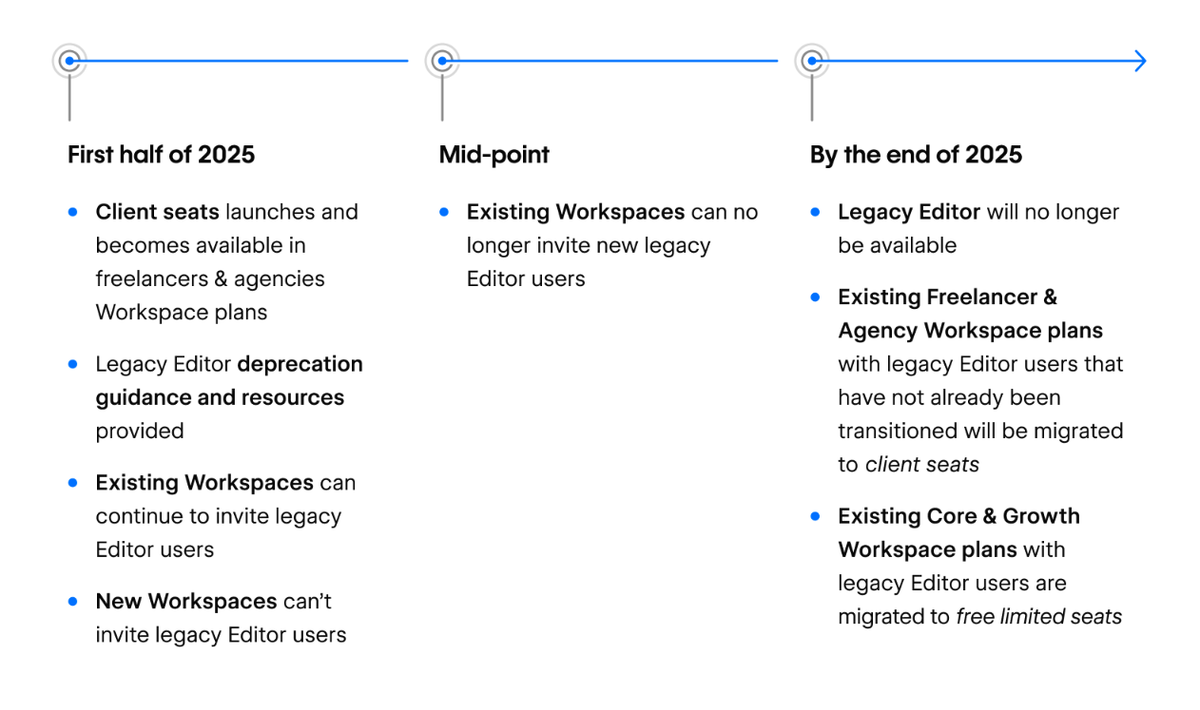
These new features will be rolled out through 2025, with the bulk of the migration planned for mid-2025.
Once released, clients will edit their site using the designer's editor mode rather than the legacy editor.
I'll explore the benefits below, which are incredibly huge.
But before then, let's touch on another important facet of the new setup, which involves how a client's edit-only access is allocated.
Before the migration, the number of legacy editor users a client has is governed by the Site Plan they use. The CMS Plan allows up to 3 legacy editor users, and the Business Plan allows up to 10.
After the mid-2025 migration, all of that is going away in favor of a new Workspace-centric approach.
When a client's site is hosted within an SP's Agency / Freelancer workspace;
- The client's edit-only access will be governed by a new, special workspace seat type called a client seat##.
- These client seats are part of the SP's Freelancer / Agency workspace.
- They are site-specific. The client only has access to view and edit their own site.
- The number of edit-only client seats a customer can have depends on the SP's workspace level. A Freelancer workspace can grant 1 client seat per hosted site. An Agency workspace can grant up to 3 per hosted site.
- Client seats can have the role of Content editor, Marketer or Reviewer.
We'll circle back on this later, for some practical guidance on the different configuration approaches you have.
But for now, let's pivot to why this change matters so much.
What are the benefits?
The Benefit to Clients
Webflow has released a lot of features in the past few years and the legacy editor has fallen behind the curve. It supports virtually none of Webflow's newer capabilities, which makes it very limited, and difficult to use.
The new client seat gives direct access to the designer's edit mode, and with it access to critical features such as;
- Localization
- Component properties
- Asset Manager, and image alt text
- Quick finder
- Commenting
- Analytics access
- and more...
Here's a full breakdown on Webflow's FAQ.
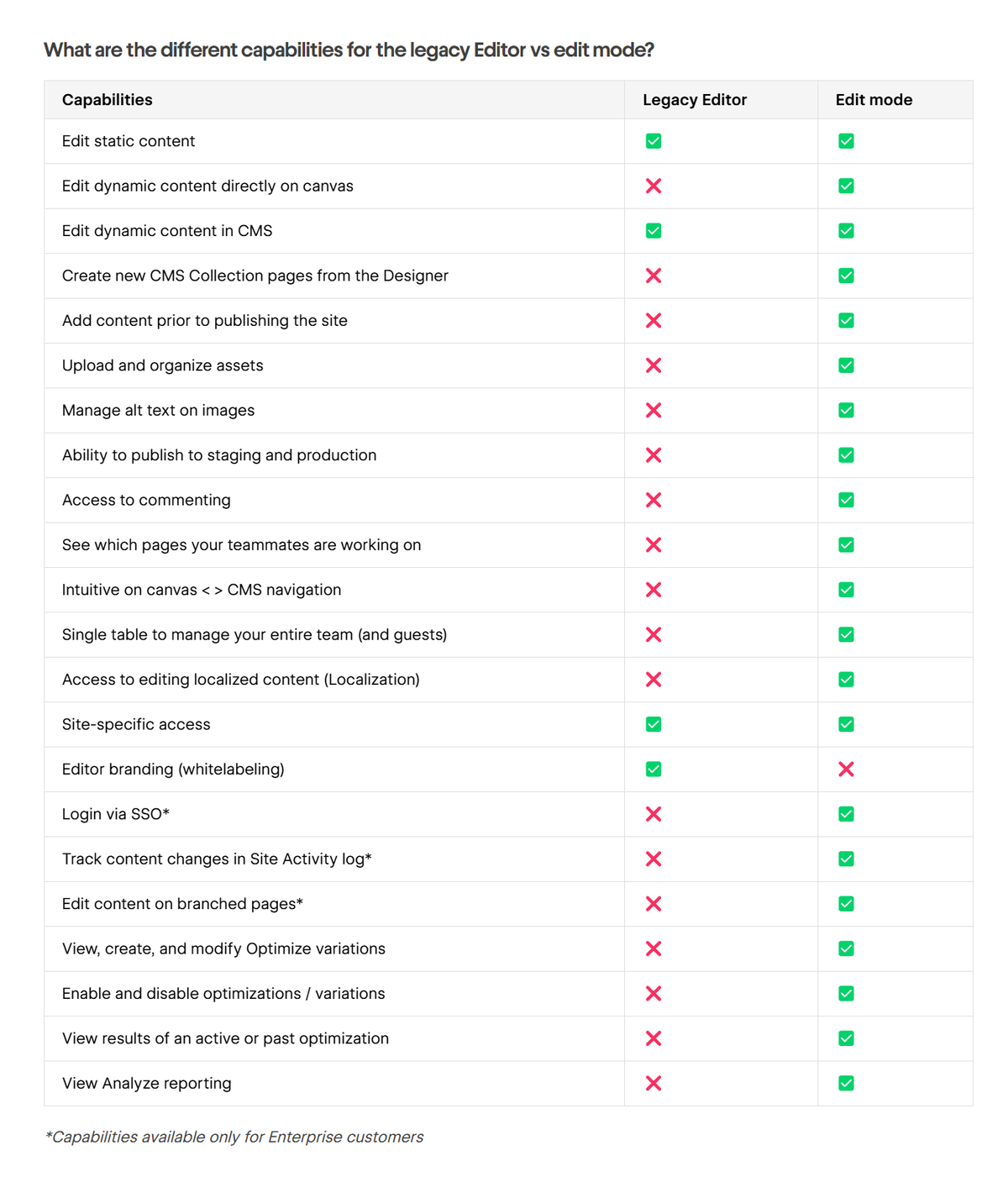
The benefits of this really cannot be overstated.
Besides giving clients a far more stable, polished, and professional way to edit their sites ( which makes SP's look good too ), it ensures that the ongoing features developments like component enhancements and the AI writer will be available to your clients too.
The Benefit to Agencies & Freelancers
Agency and Freelancer SP's also benefit in two ways;
First, we will have an added benefit to provide to clients.
"Host with us, and you'll get up to 3 free client seats [ Agency ] to edit your site- including localization, components, commenting, and more."
This favors hosting within the SP's own workspace, which works especially well alongside the new client payments and seamless transfers.
Second, we can now invite clients to work on the project while the site is being built, and before the hosting plan is added.
This creates a much more professional client experience but during the site build and long-term after the site is launched, and results in a much more polished site on launch day.
When will this happen?
Here's Webflow's published timeline for the migration;
Will costs increase?
In general, the client seat changes do not affect costs for Agencies, Freelancers, or current clients.
Even clients who are hosting in their own client-owned workspace, and have 10 legacy editor accounts, will be given 10 client seats at no added costs.
What about after the migration?
However these changes could impact NEW Site Plans established after the mid-2025 migration.
At that point, legacy editor seats are no longer available on Site Plans, and the new client seats will be limited to the 3 maximum provided by an Agency workspace.
Sygnal has an Agency account with 50 hosted clients, and we've never yet seen a client who actually needs more than 3 edit-only accounts ...but it's conceivable some client would, so let's explore that.
Webflow has not yet released enough details to be certain, but let's suppose that in 2026, we have a new client who requires either;
- More than 3 edit-only client seats, OR
- An account with full designer access
Then I speculate that the best hosting setup for this client might be;
- Client-owned Starter workspace ( free )
- Site is seamless-transferred to that new workspace
- Client gets;
- 1 x full designer seat, as workspace owner
- 1 x client seat, due to their affiliation with you as their service-provider **
- Client purchases any additional seats they require. Edit-only seats are "limited seats" and cost $15/pm.
** This is a strange edge case. The way Webflow's team explained it to me is that SP's will have the ability to "manage" a Starter plan, and in this scenario, the client will get a free client seat.
We'll know more as more details are released later, but my suspicion is that this is an effort to support the client-owned workspace hosting scenario after 2025, for the few clients that want to keep that.
In my view 1 x full seat + 1 x edit-only seat is a fantastic tradeoff in that setup.
Scenarios
Let's re-examine this from a use-case perspective. Here are the common scenarios, and how they work before and after the client seats migration.
Summary
This announcement was maddeningly complex, and caused a lot of panic in the community. It would have benefitted from a much clearer timeline-based diagram of the changes to help customers understand the before-and-after changes for their scenario.
But despite the complexity of the announcement, the team at Sygnal is stoked about the editor changes and client seats in particular.
This is an awesome step forward, with a better design and a huge amount of value for both clients and for freelancers & agencies;
- Existing clients don't lose any editor seats
- All clients, current and new, get full editor-mode access through the designer, which is easily 10x better.
- Freelancers & Agencies can now invite clients to edit client content during the site build before the site plan is added.
We're looking forward to seeing this live!
Key Takeaways
Make sure to divide the world into "before mid-2025" and "after mid-2025" because they're distinctly different.
- Site plans established before mid-2025 will still have legacy-editor seats tied to the site plan, and these will all be migrated to client seats for free after the migration.
- Site plans established after mid-2025 will follow the new client seats arrangement.
References
Webflow's announcements;
- Updates to our pricing and product strategy for December 2024
- Pricing and product updates reflecting our shift to the Website Experience Platform
More useful references;
- Austin Klubenspies' FB post offering a bullet-point summary of the announcements.
- Nelson's video on the pricing model changes.