


The Webflow Slider has a built-in pause-on-hover effect, but in some cases you want to prevent that, especially in a decorative slider that is not intended for user interaction.
Preventing Pause-on-Hover
The Webflow forum has a lengthy discusson on this, with a number of approaches.
https://discourse.webflow.com/t/disable-slider-pause-on-hover
I've selected a few key approaches here that are straightforward and work well.
From Raj Badewar-
https://discourse.webflow.com/t/disable-slider-pause-on-hover/133172/19?u=memetican
Give a class name to parent slider element and in the style panel under Events option select the none option.
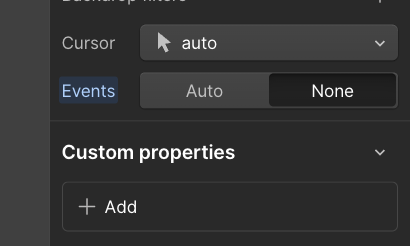
This will work the same way as CSS code making pointers none and allowing slider animation to work even on mouse hover .
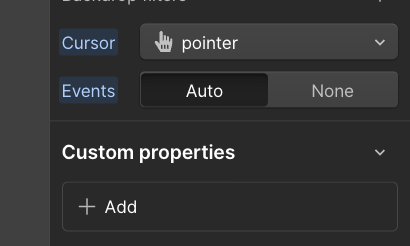
And if you have button or link element then select the button class make the cursor pointer and Events to Auto, stops the animation on hovering over the button/link only.
Supporting Nav Buttons
Despite the fact that it's not fully interactive, you might want to allow the user to swipe, and may have the left-right buttons visible.
In that case there is a second issue which is that when you click the buttons, the slider has focus, and still pauses.
Here's a technique from Chris-
https://discourse.webflow.com/t/disable-slider-pause-on-hover/133172/21?u=memetican
<script>
  document.querySelectorAll(".w-slider").forEach(slider => {
    slider.addEventListener("mouseenter", e => e.stopPropagation(), true);
    slider.addEventListener("mouseover", e => e.stopPropagation(), true);
  });
</script>
