



Published
April 11, 2026
Updated
April 11, 2026
Great for local image generation.
✅ All capabilities here depend on the model and workflow you utilize. Capable models include SDXL and Flux.
Requirements
Requires local AI capability
- NVIDIA card
- Apple Silicon
Performance Notes
Image generation performance depends entirely your hardware.
Here are two example systems I run.
- Mac Mini M4 16GB - 3 to 5 minutes per image
- Win 11 NVIDIA 4090 24GB - 3 to 5 seconds per image
Sizing Images
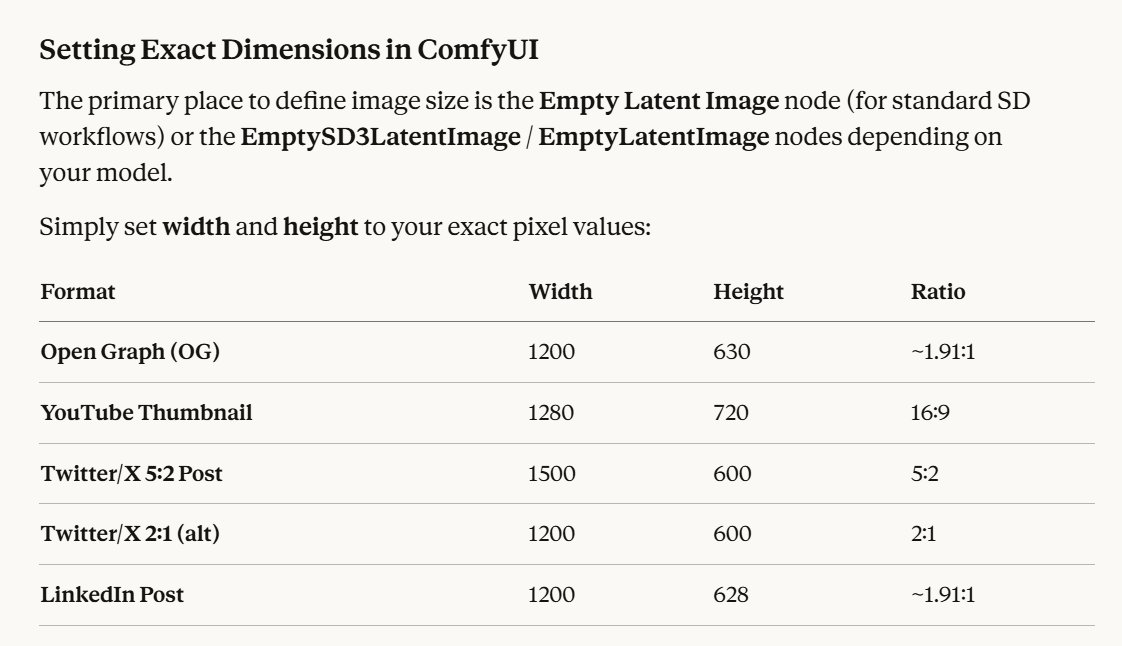
Generally, just hardcode the exact width and height in the Empty Latent Image node. As long as you're using a capable model (SDXL or Flux) and stay within a reasonable size range, you'll get pixel-perfect aspect ratios every time with no cropping required.
Important Caveats
Multiples of 8 (or 64)
SD models require dimensions to be multiples of 8 -- all the sizes above satisfy this. Some models (especially older SD 1.5) work best with multiples of 64.
Stay near your model's native resolution
- SD 1.5 → native ~512×512. Going to 1280×720 directly can cause quality issues (duplicated subjects, distortion). Better to generate at a lower res and upscale.
- SDXL → native ~1024×1024. Handles 1280×720 well natively.
- Flux → very flexible, handles arbitrary sizes well.
Recommended workflow for sharp results at large sizes:
- Generate at a lower resolution matching your target ratio (e.g., 640×336 for 16:9)
- Use an upscale node (e.g.,
UpscaleModelLoader+ImageUpscaleWithModel) to hit final pixel dimensions - Optionally run a hi-res fix / img2img pass for sharpness
Aspect Ratio Helper Nodes
If you want a more ergonomic workflow, several custom node packs add ratio-picker UIs:
- ComfyUI-Custom-Scripts -- adds a resolution picker
- CR Aspect Ratio node from ComfyUI_Comfyroll_CustomNodes -- lets you pick named ratios and a base pixel count, then auto-calculates W×H
- SDXL Recommended Resolutions nodes -- surface the officially trained SDXL resolution buckets closest to your target ratio
Tips
- Claude is very good at assisting with workflow revisions. Use screenshots, etc to have it explain configuration changes.

