



As of Apr 2026, Webflow's components do not yet support;
- Binding styles to component properties
- Binding custom styles to component properties
- Embedding component properties within Embed element content
One of the core use cases for this type of functionality is styling.
Example
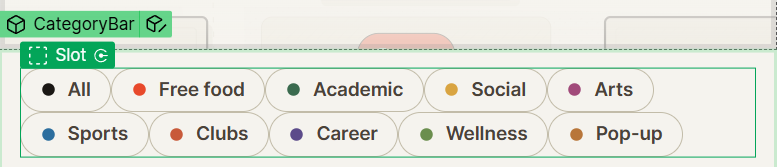
Suppose you want a simple little Chip like this. Each Chip is a component, with two properties;
- Text
- Color, which is applied to the SVG dot
Historically, you'd need to;
- Bind the value from the Color prop to an attribute
- Run JS that finds that attribute, and re-applies it as a variable in style
It's messy, it's complex, it generally has FOUC ( flash of unstyled content ) issues since the JS runs at the end of the page.
CSS attr() a better way
Most browsers [ not all, see below! ] support CSS attr() which allows you to;
- Retrieve CSS values from element attributes
- Default to a fallback value if the value does not exist, or if attr() is unsupported
It looks like this;
Here's an example, retrieving a "color" attribute, converting it to a CSS color value type, and defaulting to specific variable values otherwise.
attr(color type(<color>), var(--chip-dot, var(--accent)))We can use this directly in CSS or in Webflow custom styles to
How to Use This in Components
When you want to pass Component property information into CSS for styling purposes, there are 3 steps;
1 - Create your Property as a Text prop
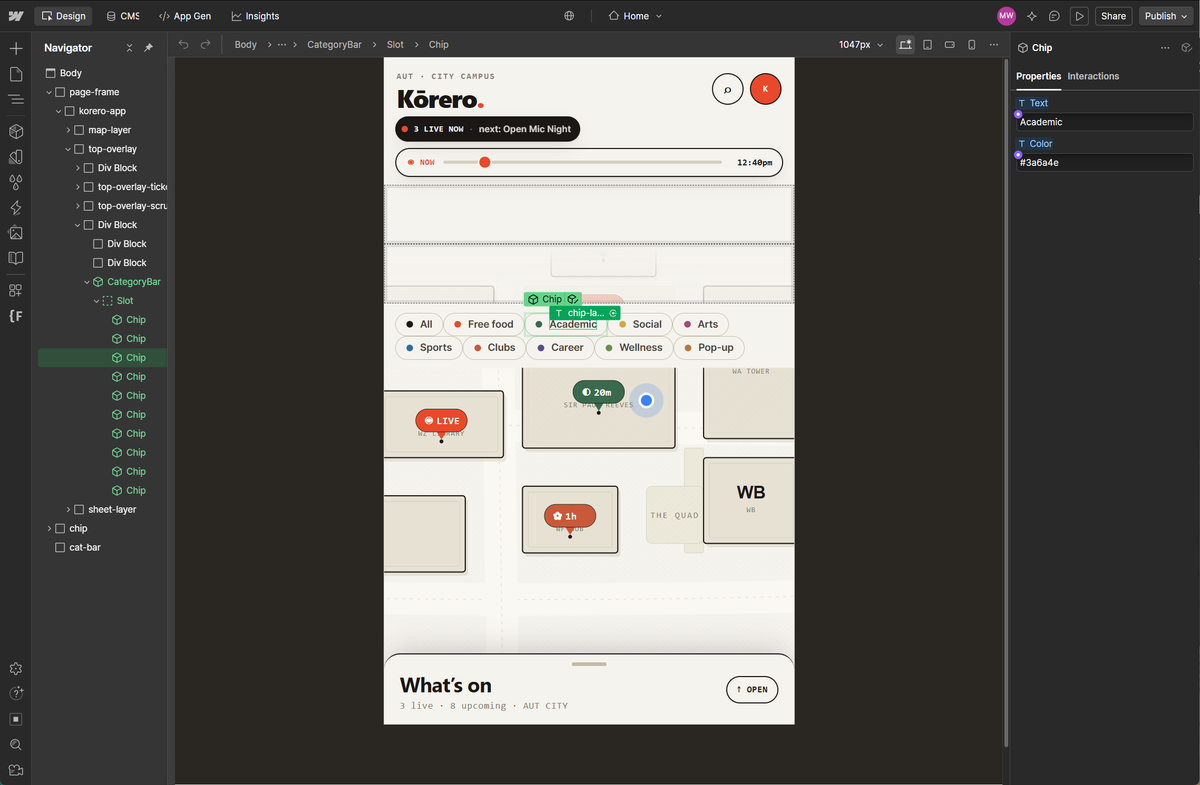
2 - Bind it to an Attribute on relevant Element
Typically the element you are affecting, but you can use CSS selectors to control this in significant detail.
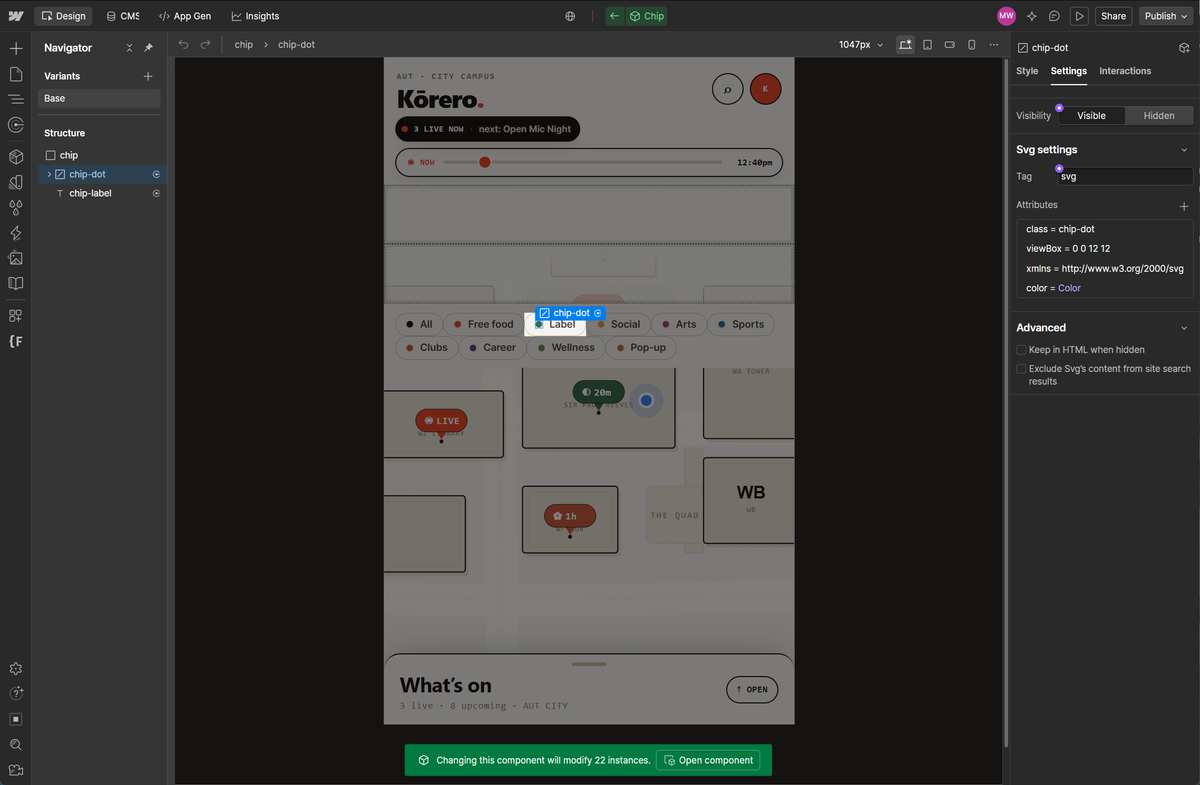
3 - Use the attr() CSS in your design
- Webflow custom styles, seen bottom right in this screenshot
- Or, a custom Embed with a
<style> block
What browsers support attr() ?
Here's the state of advanced/typed attr() -- attr(name type(), fallback) and similar -- as of April 2026:
Chromium-based browsers (Chrome, Edge, Opera, Brave, Arc): Solid support. It shipped in Chrome 133 in February 2025 and has been stable since. Starting from Chrome 133 (more browsers are working on this as well), you can use the attr() function with any CSS property, whereas in the past it was only supported by the content property.
Safari: Supported. It wasn't there in early 2025 -- in April 2025, developers were noting that Safari didn't support the typed attr() function yet -- but by early 2026 it had landed. A January 2026 roundup of CSS features confirms that typed attr(), along with sibling-index() and related features, are now available in stable Chrome and Safari. So Safari 26+ on macOS, iOS, and iPadOS has it.
Firefox: Still not shipped in stable as of April 2026. Mozilla's experimental features page (updated April 17, 2026) lists the attr() CSS function supporting values as an experimental feature tracked under Firefox bugs 1986631 and 1998245, and you have to flip a preference to true to enable it. So Firefox users on default settings will fall through to your fallback value. MDN as of its April 18, 2026 revision still flags advanced attr() with its "Experimental" warning for this reason.
Baseline/Interop status: It's not "Baseline widely available" yet -- it's a focus area of Interop 2026, which is the cross-browser push to get Firefox caught up and shake out inconsistencies. WebKit's Interop 2026 announcement calls out attr() specifically as one of the features getting work to give more flexible ways to architect CSS. Realistically, expect it to reach full Baseline sometime during 2026 once Firefox ships it.
Practical takeaway for today: You'll get the feature for roughly 85-90% of real-world traffic (all Chromium + Safari), and the rest will hit your fallback. If you want to branch behavior explicitly rather than relying on the fallback argument, you can feature-detect:
@supports (x: attr(x type(*))) {
  /* Modern attr() available */
}
@supports not (x: attr(x type(*))) {
  /* Firefox today -- use a static fallback */
}
One practical tip: always provide a sensible fallback as the second argument to attr() -- attr(my-color type(), black) -- because in Firefox the whole declaration will be invalid and the property will revert to its inherited/initial value if you don't, which can produce unexpected results.

