


This article assumes you're an Agency or Freelancer, who has built a Webflow website for a client. Once the site is built, there is an ongoing maintenance process as new content is added.
This article is specific to that site-management process, not the site-build process which has other priorities & considerations.
Is Webflow's MCP useful for clients?
Webflow's MCP is very powerful, but you want to be careful to put it in the right hands. Clients with low technical aptitude can damage the site, so you want to provide access where it makes sense.
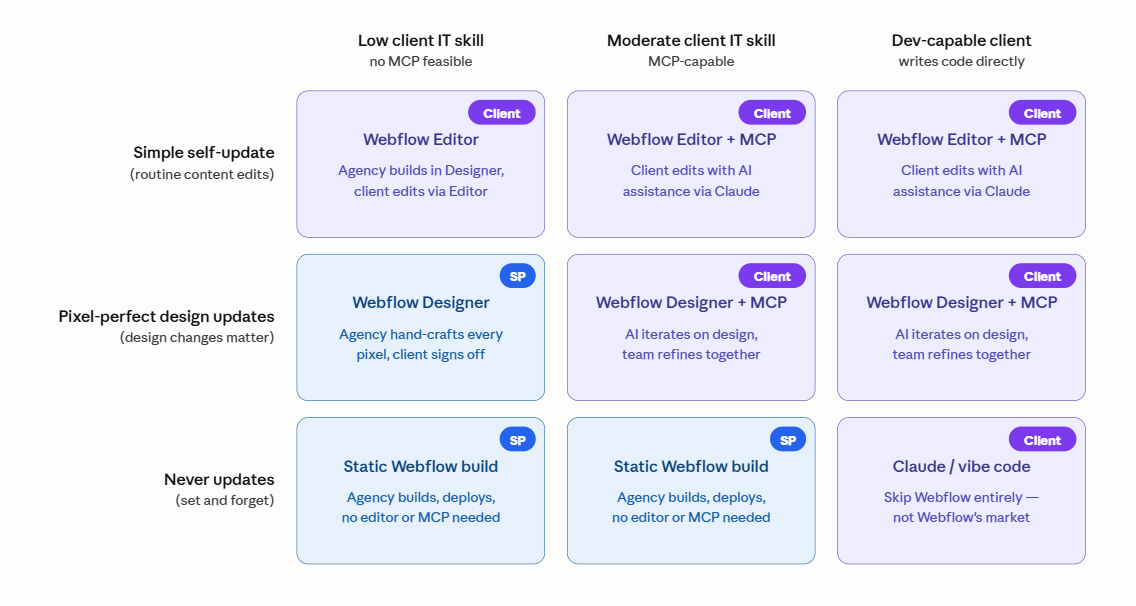
Here's a representation of how different types of site updates can fall across different types of clients.
Some should use the Editor only. Others can use the MCP. Still others might have full designer + MCP access.
The risks are important to understand.
Currently the MCP probably isn't role-scoped, which means that the MCP does not directly understand the role of the person using it.
- Designer changes are somewhat safe, because the MCP requires the designer to be open and uses a bridge to work through that context. If the current user has editor only permissions, the MCP will not be able to make design changes. However this may cause confusion- the MCP may not know it is access-restricted, and try to make changes it can't and generate errors.
- CMS schema changes are more risky. Since those changes are made through the Data API, there is no bridge acting as a natural "bouncer" for unauthorized tasks.
The Ideal MCP Future
Ideally the MCP access can be scoped to;
- CMS only
- Possibly restricted to specific collections
- Possibly restricted to certain roles ( no schema changes, edit only, no publish... that kind of thing

