

Like many of my projects, this one began as a thought experiment.
"Notion is so great... it has such smooth editing and content organization. Would it be possible to literally manage my blogs and other Webflow CMS content using Notion alone? I edit it, it publishes- just like that."
That question lead to some thinking and experimentation and a few hours later, I find myself typing this article directly in Notion, and every minute or two, I see it automatically update my live Webflow page.
That's kinda nuts. 🤔
I can even take a screenshot, and paste it into Notion, and see that publish too.
Like this one.
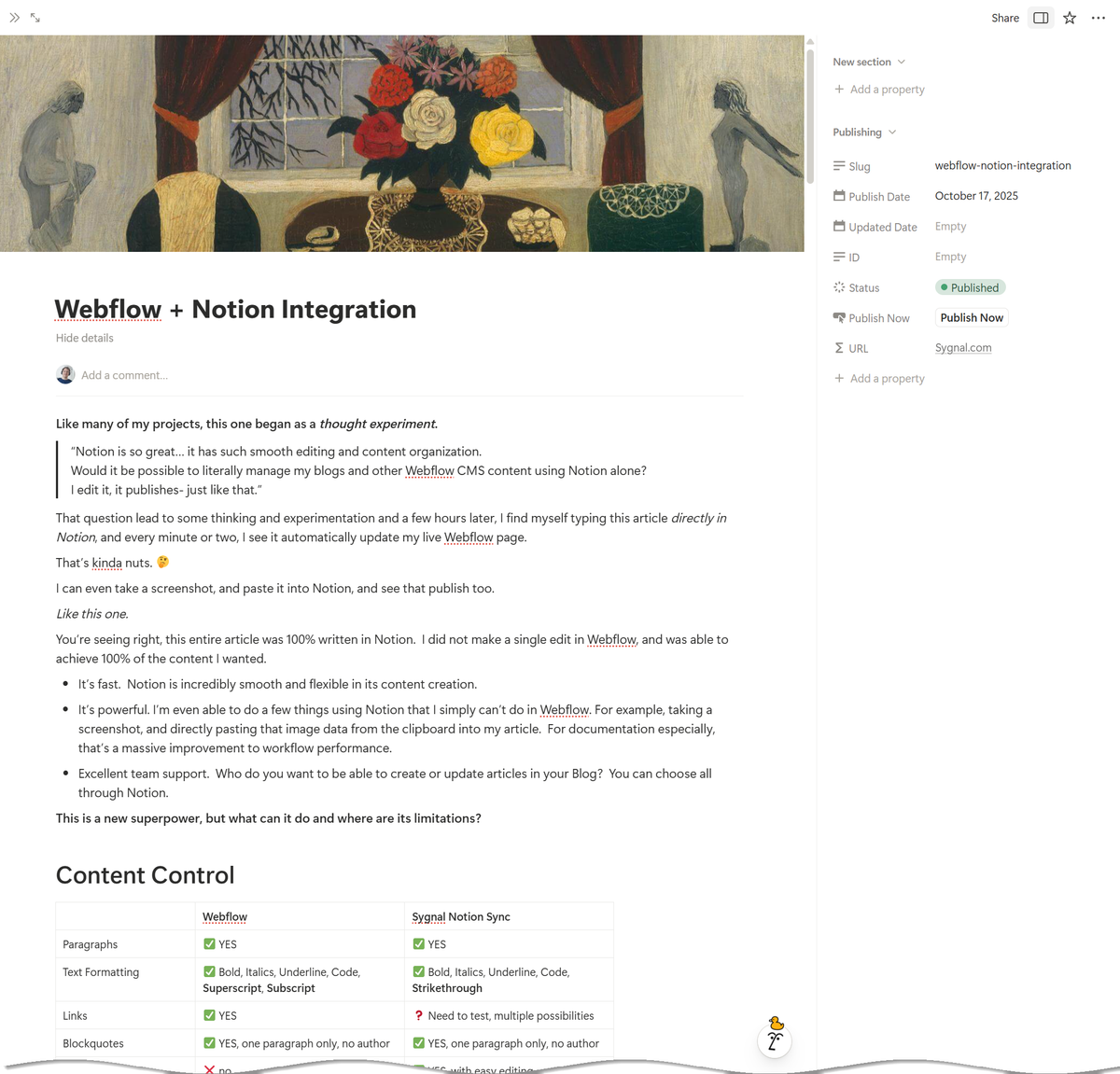
The First Experiment
You're seeing right, this entire article was 100% written in Notion. I did not make a single edit in Webflow, and was able to achieve 100% of the content I wanted.
- It's fast. Notion has an incredibly smooth and flexible editor. I'm using the desktop app, which may account for some of the performance benefits.
- It's powerful. I'm able to do a few things using Notion that I simply can't do in Webflow. For example, taking a screenshot, and directly pasting that image data from the clipboard into my article. For documentation especially, that's a massive improvement to workflow performance.
- It's fluid. I prefer to escape my office in the mornings, and do some emails and writing at cafes. That's always been a problem with Webflow, because switching between my desktop and laptop means 2-factor-authentication, and forces the other system to log out. Here, I literally have Notion open on both systems, and I walk from one to the other to do updates. The block-based design and the internal sync are so good, that so far, I can't even encountered a need to refresh anything. I actually hope Webflow's rich text element makes a hard shift in this direction someday.
- It supports teams. Who do you want to be able to create or update articles in your Blog? You can choose all through Notion.
Ok, so the first experiment went wildly better than anticipated.
This is clearly a new superpower, but what can it do and where are its limitations?
Here's what I'm seeing so far. Remember, I'm less that 5h into this build, which means there is a lot of opportunity for improvement... exciting times ahead.
Content Control
So far, here are the strengths and weaknesses of each content editing approach.
Webflow | Sygnal Notion Sync | |
Paragraphs | ✅ YES | ✅ YES |
Text Formatting | ✅ Bold, Italics, Underline, Code, Superscript, Subscript | ✅ Bold, Italics, Underline, Code, Strikethrough |
Links | ✅ YES | ❓ Need to test, multiple possibilities |
Blockquotes | ✅ YES, one paragraph only, no author | ✅ YES, one paragraph only, no author |
Tables | ❌ no | ✅ YES, with easy editing |
Emoticons | ❌ no | ✅ YES, use conventional |
Colored Text | ❌ no | ⚠️ Supported in Notion, working on syncing this into Webflow |
Images | ✅ Can present as Full width, Centered, Float Right and Float Left | ⚠️ Can present only full-width, considering some pre-tagging options |
Adding Images | - Can upload directly. - Can paste HTML that contains an image tag, which will then be uploaded. | - Can upload directly. - Can paste HTML that contains an image tag, which will then be uploaded. - Can paste images and screen captures directly from the clipboard |
Image Captions | ✅ YES | ❓ Testing |
Code Blocks | ✅ YES, but no built-in copy code feature | ⚠️ Yes, but no syntax highlighting yet |
AI Content Creation | ✅ YES | ✅ YES |
Publishing Controls
Just as important are the publishing controls, and this area needs some thought.
Webflow | Sygnal Notion Sync | |
Publishing Speed | ✅ Pretty much instantaneous, when you click Publish Now. | ✅ Automatic, but takes 1 to 2 minutes before the update occurs. |
Draft Changes | ✅ YES, make changes that are not published immediately | ❌ no |
Unpublish | ✅ YES | ✅ YES. Change the status of the article to In progress, or just drag-drop it out of the Published column in the kanban. |
Here's an example of the simple Blog-specific kanban view I'm currently using in this prototype;
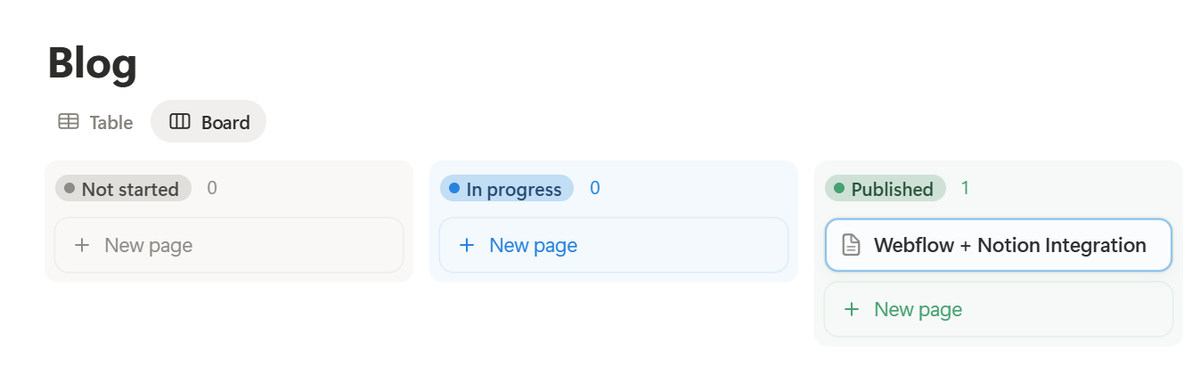
- Not started - for creating new article ideas quickly, adding links in to sources, etc.
- In progress - anything I'm currently writing
- Published - live on the site
No matter the state, I can edit the article and changes are pushed into the Webflow CMS automatically.
Content Examples
Paragraphs
Blockquotes
- Unordered lists
- Ordered lists
Text formatting bold, italics, strikethrough , underline, code
Images, including paste-directly from the clipboard images
Dividers ( hr )
Simple, preformatted code blocks
like this one, no syntax-highlighting yet
Simple tables
Heading 1 | Heading 2 | Heading 3 |
Row 1 data | Row 1 data | Row 1 data |
Row 2 data | Row 2 data | Row 2 data |
Heading & Automatic Heading Shift
In Notion, it's easiest to start with H1 as top-level headings, and progress your way to H6, but in your blog's rich text field you may want your headings to start at H2 or H3.
Sygnal Notion Sync can automatically adjust your headings so that Notion's H1's become H2's in Webflow, to ensure styling and semantic SEO consistency in Webflow.
Publishing Process
Here's the current process;
- Create the article in Notion
- Complete the article
- Use the Status to control the state of the article - Idea, in-progress, published, etc. Use Notion's kanban Board view to make drag and drop state changes quickly.
- When you change the status to Published, it is published live in the CMS. Dragging it back out would unpublish that article.
Remember, any change can take 1 to 2 minutes to update. Notion does not send changes instantaneously for each character you type, and some changes require processing such as image uploads, HTML conversion, and so on by our middle-tier solution.
Best Practices
Table Styling
HTML Tables are not automatically styled in Webflow. Add an embed with your table styling, and you can isolate it to rich text elements if you prefer.
<style>
  .w-richtext table { font-size: 18px; margin: 1.6rem 0 1.6rem 0; }
  .w-richtext table td { padding: .6rem .8rem; border: solid 1px black; }
  .w-richtext pre { font-size: 18px; }
  .w-richtext code { color: #ed2125; }
</style>
Setup
So far, publishing is Notion Database-centric. A single Notion Database publishes to a specific Webflow Collection, with a specific field mapping.
- Notion is used as the source of truth ( SSoT )
- Changes in specific Notion databases are published by webhook to a Cloudflare worker I have running
- That worker disassembles, and makes the necessary webflow API calls
Key Learnings So Far
- Always remove line breaks in HTML before updating Webflow richtext fields in the API. If you do not, lists and other structures will break.
- Publishing rules; use
/liveto publish and unpublish
Research & Development
Styling
- Superscripts / subscripts
- Formulas
- Text coloring by word
Images
Currently no way to specify Webflow's layout, e.g. full width, centered, float right, float left...
Captions
Draft Changes
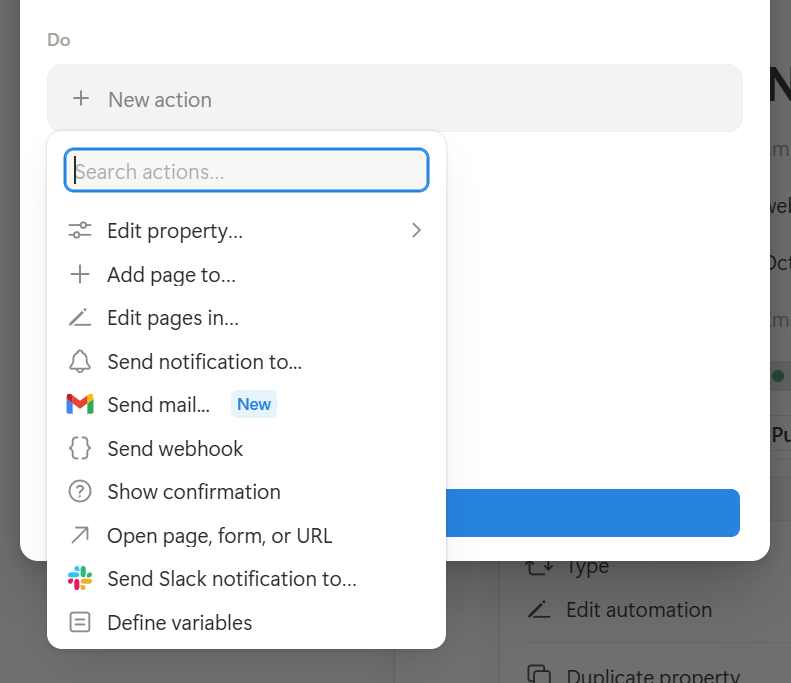
Some means to allow changes without publishing, and then release them all at once.
Buttons exist as a Database item field type in notion, along with a Send webhook capability. Using this, we could deliver regular updates as Saved Changes, and then use the secondary webhook to Publish Now.
Blockquotes w/ Citations
Footnotes
Lists-in-Tables
Automatically format cell content beginning with - or * as list items, using line breaks to distinguish.
Image optimization, e.g. AVIF
Code Blocks
With syntax highlighting
Bugfix - remove the scrollbar from the current preformatted blocks
Embeds
Nested Lists
- Level 1
Table Styling
Identify header rows or columns.
Possibly sortable columns
Consider special rules, in the form of a paragraph lead with :: and specific syntax
:: table headerrow=1 headercol=1 height=x scroll=yHeading 1 | Heading 2 | Heading 3 |
Row 1 data | Row 1 data | Row 1 data |
Row 2 data | Row 2 data | Row 2 data |
Code Components
Conceptual
Callouts
To Do Lists
Oddly sort of works but of course doesn't do anything.
To-do
Video
- Player auto-gen for external URLs
Audio
- e.g. Soundcloud embeds
Toggle Lists
Accordion / expando
Column Layouts
Objects, like Excalidraw
Raw HTML / JS insertion
Currently a raw HTML like this span will automatically be rendered through into the CMS.
Currently seeing some problems with single and double quotes.
CMS Sanitization
Understand and mitigate the impacts.
Stylized Quotes
Notion automatically converts single and double-quotes to stylized angled versions. This could be useful, except when we want raw HTML.
Experimenting, currently...
- Converts smart/curly quotes (
''"") to straight quotes ('") - Converts ellipsis (
...) to three dots (...) - Converts en-dash (
-) to hyphen () - Converts em-dash (
--) to double hyphen (-) - Converts non-breaking spaces to regular spaces
Bi-directional sync
Ability to do an initial push for a CMS item into a Notion DB, from there the Notion DB owns it
Unpublished Sections
Some means to have in-progress content within the Notion doc, which is not published to production.
Staging-only Preview
- Queue-to-publish an item
- Publish full site to staging
- ? Change item back to Draft
Other Applications
Publishing Technical Docs
Currently the focus is Notion → Webflow publishing, but one of the key use cases for Notion at Sygnal is managing technical documention for projects, and for clients.
We're in the process of replacing Gitbook, and the smoothness here is phenomenal.
One possibility is creating a second publishing engine that syncs from Notion to Markdown, specifically in a docs base pattern like;
- Docusaurus
- Nextra 5 - which we've migrated Sygnal's HSON documentation to.
Conceptually, the advantage here is that it
- Supports a proper editing environment rather than working with raw Markdown
- Still uses a Github repo as the base, and simply performs commits
We'd want to give some thought to;
- ToC management
- Commit descriptions
- Image handling, in
/public - React components, which Nextra supports
Publishing Client Project Docs
- Same as above, but secured to the client
Dynamic Docs
Rather than converting to MD and syncing to a repo, simply direct publishing from Notion.
Need to resolve;
- Exposing a page hierarchy on a subdomain or path, e.g.
https://mydocs.site.com - Document structure
- Mixed use of Notion's page hierarchy and Notion databases
- Secure access controls
- Permalinks, so page moves are still accessible
Systems Planning
The webhooks are designed to specify a configuration profile;
https://api.mysite.com/v1/notion/webhook/:configFor example;
https://api.mysite.com/v1/notion/webhook/blogWhen calls are made to this webhook endpoint, the profile blog is then retrieved from the KV store, which identifies;
- What Collection we're updating
- Specific field mappings
This is how we tie a specific CMS collection to a specific notion database, through a specific webhook.
Configuration
- Notion API key stored in cloudflare secrets for the worker
- Webflow API key stored in cloudflare secrets for the worker
In general a given deployment will be for a single Webflow site but may have many Notion Db's
Future
Significant updates to the configuration process. The solution now can map any Notion DB to any Webflow CMS collection, with specific field-mapping configurations.
